Author Topic: Leg-spike Fix (Clamod Fenki)  (Read 2103 times)

Kieve

  • Hydlaa Citizen
  • *
  • Posts: 348
  • Creative Hack
    • View Profile
    • KRS MediaWorks
Leg-spike Fix (Clamod Fenki)
« on: December 05, 2008, 06:04:29 am »
When I made the new Clamod skin for the fenki, I used some alpha-channel trickery to make the leg spines disappear.
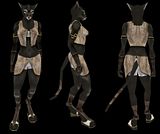
Unfortunately, the tweaks I made to work this bit of digital magic weren't accounted for in the main release. Instead, this results in the spines being rendered as black artifacts, and not simply vanishing as they should.

This little patch should fix that, until it's made official.
Enki_F Fix

Instructions:
(Disclaimer - I use WinXP, instructions may vary slightly depending on what OS you run)
-In your Planeshift\Art directory, you should find a file entitled characters.zip
--Most OS's these days have .zip extraction built in, but if not you may need to download a separate tool in order to unpack it.
-Unzip (extract) the characters.zip file into a temporary folder or space, and locate the subfolder entitled enkif
-Unzip the above download file (provided in link) and move both extracted files into the enkif directory. Allow them to overwrite the existing files
--enkif.cal3d
--enkif_legs_3.dds
-With that done, select [all] the unpacked subfolders (dermf through to ynnwnm) and repack them as a new archive (.zip). Name this new file characters.zip
-DO NOT OVERWRITE the old characters.zip file. Rename it to something such as characters.bak (backup).
--Reason being, the updater will likely throw a hissyfit when it detects a modded characters.zip file, ergo you want to keep the old version around for updating reasons.
--Bear in mind, any updates will probably require you to repeat this process.
-Move the 'new' characters.zip file into the Planeshift\Art directory, and enjoy.


If you need assistance on working with ZIP files, this is your best bet:
Compressed (ZIP) file help
If you've got questions about character modding, that's when you'll wanna pester me. :)
« Last Edit: December 16, 2008, 07:00:46 am by Kieve »


Morla Phlint

  • Hydlaa Citizen
  • *
  • Posts: 376
  • Rrivaln hrraln mo hetakh! (Enkien)
    • View Profile
Re: Leg-spike Fix (Clamod Fenki)
« Reply #1 on: December 05, 2008, 04:28:10 pm »
Nice  :thumbup:, I'll try it when the server is back up.

since 0.3.019 Crystal Blue || Sometimes a ragequit is the right decision.

Samno

  • Traveller
  • *
  • Posts: 40
    • View Profile
Re: Leg-spike Fix (Clamod Fenki)
« Reply #2 on: December 14, 2008, 09:26:10 pm »
That's some awesome work man, do you have any more?

Kieve

  • Hydlaa Citizen
  • *
  • Posts: 348
  • Creative Hack
    • View Profile
    • KRS MediaWorks
Re: Leg-spike Fix (Clamod Fenki)
« Reply #3 on: December 15, 2008, 07:46:46 am »
I do, but posting them would prohibit them from being included in future releases.


Arerano

  • Hydlaa Citizen
  • *
  • Posts: 231
    • View Profile
Re: Leg-spike Fix (Clamod Fenki)
« Reply #4 on: December 15, 2008, 07:29:21 pm »
It doesn't work for me. The front of the legs turn half-transparent which looks really strange.  ::|


Using an ATI X-1800 XT, Windows XP
« Last Edit: December 15, 2008, 07:33:32 pm by Arerano »

Kieve

  • Hydlaa Citizen
  • *
  • Posts: 348
  • Creative Hack
    • View Profile
    • KRS MediaWorks
Re: Leg-spike Fix (Clamod Fenki)
« Reply #5 on: December 16, 2008, 07:02:00 am »
Ah, that is strange.

Seems the alpha-channel on the texture is goofed. Fixed the download - try it now. :)


Arerano

  • Hydlaa Citizen
  • *
  • Posts: 231
    • View Profile
Re: Leg-spike Fix (Clamod Fenki)
« Reply #6 on: December 19, 2008, 05:48:27 pm »
Yes it works now.

Great idea to simply make the spikes invisible by using transparency!  :)