Author Topic: Graphics problems  (Read 969 times)

Sikyos

  • Wayfarer
  • *
  • Posts: 3
    • View Profile
Graphics problems
« on: April 24, 2006, 05:22:00 pm »
I recently re-downloaded (is that a word?) and updated planeshift. I have encountered a rather worrying problem :-\
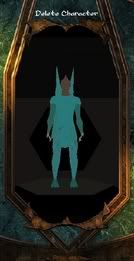
Namely this:


This kind of thing carries on even when I'm in game, it seems as if the models are there but the textures are...not...
I have no idea what could be causing this, except maybe this:
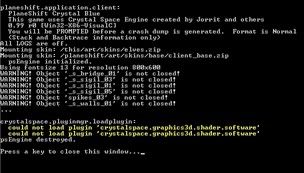


Anybody out there that can help me....?

acraig

  • Administrator
  • Veteran
  • *
  • Posts: 1562
    • View Profile
Re: Graphics problems
« Reply #1 on: April 24, 2006, 05:55:35 pm »
It seems like the dll for the shaders is either missing or corrupted.  I don't have the code in front of me at the moment but later on I can see exactly what the DLL is that the shaders need and make sure it's the same size/md5 for it. 
----------
Andrew
"For all I know, she's lying, everyone's lying; welcome to the Internet"

Sikyos

  • Wayfarer
  • *
  • Posts: 3
    • View Profile
Re: Graphics problems
« Reply #2 on: April 24, 2006, 07:24:31 pm »
::| I think thats good. But then again, for me, uninstalling and re-installing is the extent of my technical fixy thingy know-how. That and hitting the monitor really hard until it surrenders its secrets to me...

DaveG

  • Forum Addict
  • *
  • Posts: 2058
    • View Profile
Re: Graphics problems
« Reply #3 on: April 24, 2006, 07:37:57 pm »
Have you run PS on that machine with that graphics card before?

Edited to add the standard stuffs:
Update your graphics drivers.
« Last Edit: April 25, 2006, 12:54:24 am by DaveG »

::  PlaneShift Team Programmer  ::

Falcon_Amanatay

  • Traveller
  • *
  • Posts: 15
    • View Profile
Re: Graphics problems
« Reply #4 on: April 25, 2006, 12:52:25 pm »
Hello. That screenshot there. It looks deadly similiar to the way mine is being displayed. Just to say. But I already have a topic of my own.

~Amanatay

Sikyos

  • Wayfarer
  • *
  • Posts: 3
    • View Profile
Re: Graphics problems
« Reply #5 on: April 25, 2006, 04:57:06 pm »
:oops: It seems that whatever it was was fixed simply by updating my drivers. Goes to show...something...If you haven't tried that yet falcon, it might be worth a try. Anyhoo, thanks guys!  :)

Safturento

  • Wayfarer
  • *
  • Posts: 3
    • View Profile
Re: Graphics problems
« Reply #6 on: April 29, 2006, 03:26:46 am »
::| I think thats good. But then again, for me, uninstalling and re-installing is the extent of my technical fixy thingy know-how. That and hitting the monitor really hard until it surrenders its secrets to me...

hahahahahahahahahaha dude thats funny i broke like 5 screens smasheing them i hate when computers dont do what i want them to -.-

fywul

  • Wayfarer
  • *
  • Posts: 1
    • View Profile
Re: Graphics problems
« Reply #7 on: May 08, 2006, 06:47:21 pm »
I know that yoru problem has been fixed \\o//  anyway im having that same problem but with the plants and trees... they have like a... thin sheet of what looks to be like a mirror on them and i could always see myself... and updating the game always helped me oh and dont hit your computer it will only make it cry :'(
<(^.^)>   (b^.)>  <(Krb)>  ^(^.^)^
    |  |         |  |         |  |          | |
front,side,back, front.
keryby says "Do you like my tatoo"
Everybody do the kerbydance
___________________
help kerby take over the world with his dance by copying him into your sig in every forum that you go to!

Cherppow

  • Hydlaa Citizen
  • *
  • Posts: 493
    • View Profile
Re: Graphics problems
« Reply #8 on: May 19, 2006, 12:14:11 pm »
I experienced similar graphical problems as shown in Sikyos' screenshot. Like textures were missing and only base material shown. The game still ran though.

Loading PS also gave following warnings.
crystalspace.graphics3d.shadercompiler.xmlshader:
  snippets/fog-mappings.inc: no <include> node
  snippets/fog-fvp.inc: no <include> node
  snippets/fog-ffp.inc: no <include> node
  snippets/fog-pass.inc: no <include> node

On my case it was due to incompatibility with my installed CS art pack and PS. Removed crystal environment variable and PS ran without problems.